
Computing multiple spectrograms with the Public API [1]#
As always in the Public API, the first step is to build the project.
An Instrument can be provided to the Project for the WAV data to be converted in pressure units. This will lead the resulting spectra to be expressed in dB SPL (rather than in dB FS):
from pathlib import Path

audio_folder = Path(r"_static/sample_audio/timestamped")

from osekit.public.project import Project
from osekit.core.instrument import Instrument

project = Project(
    folder=audio_folder,
    strptime_format="%y%m%d_%H%M%S",
    instrument=Instrument(end_to_end_db=150.0),
)

project.build()
	2026-09-28 15:48:24,391
Building the project...
	2026-09-28 15:48:24,393
Analyzing original audio files...
	2026-09-28 15:48:24,402
Organizing project folder...
	2026-09-28 15:48:24,407
Build done!
The Public API Project is now analyzed and organized:
print(f"{' DATASET ':#^60}")
print(f"{'Begin:':<30}{str(project.origin_dataset.begin):>30}")
print(f"{'End:':<30}{str(project.origin_dataset.end):>30}")
print(f"{'Sample rate:':<30}{str(project.origin_dataset.sample_rate):>30}\n")

print(f"{' ORIGINAL FILES ':#^60}")
import pandas as pd

pd.DataFrame(
    [
        {
            "Name": f.path.name,
            "Begin": f.begin,
            "End": f.end,
            "Sample Rate": f.sample_rate,
        }
        for f in project.origin_files
    ],
).set_index("Name")
######################### DATASET ##########################
Begin:                                   2022-09-25 22:34:50
End:                                     2022-09-25 22:36:50
Sample rate:                                           48000

###################### ORIGINAL FILES ######################
| Begin | End | Sample Rate | |
|---|---|---|---|
| Name | |||
| sample_220925_223450.wav | 2022-09-25 22:34:50 | 2022-09-25 22:35:00 | 48000 |
| sample_220925_223500.wav | 2022-09-25 22:35:00 | 2022-09-25 22:35:10 | 48000 |
| sample_220925_223510.wav | 2022-09-25 22:35:10 | 2022-09-25 22:35:20 | 48000 |
| sample_220925_223520.wav | 2022-09-25 22:35:20 | 2022-09-25 22:35:30 | 48000 |
| sample_220925_223530.wav | 2022-09-25 22:35:30 | 2022-09-25 22:35:40 | 48000 |
| sample_220925_223600.wav | 2022-09-25 22:36:00 | 2022-09-25 22:36:10 | 48000 |
| sample_220925_223610.wav | 2022-09-25 22:36:10 | 2022-09-25 22:36:20 | 48000 |
| sample_220925_223620.wav | 2022-09-25 22:36:20 | 2022-09-25 22:36:30 | 48000 |
| sample_220925_223630.wav | 2022-09-25 22:36:30 | 2022-09-25 22:36:40 | 48000 |
| sample_220925_223640.wav | 2022-09-25 22:36:40 | 2022-09-25 22:36:50 | 48000 |
Since we will run a spectral transform, we need to define the FFT parameters:
from scipy.signal import ShortTimeFFT
from scipy.signal.windows import hamming

sample_rate = 24_000

sft = ShortTimeFFT(win=hamming(1024), hop=128, fs=sample_rate)
To run transforms in the Public API, use the Transform class:
from osekit.public.transform import Transform, OutputType
from osekit.utils.audio import Normalization
from pandas import Timestamp, Timedelta

transform = Transform(
    output_type=OutputType.SPECTRUM
    | OutputType.SPECTROGRAM
    | OutputType.WELCH,  # we want to export these three spectrum outputs
    begin=Timestamp("2022-09-25 22:35:15"),
    end=Timestamp("2022-09-25 22:36:25"),
    data_duration=Timedelta(seconds=5),
    overlap=0.25,
    sample_rate=sample_rate,
    normalization=Normalization.DC_REJECT,
    fft=sft,
    v_lim=(0.0, 150.0),  # Boundaries of the spectrograms
    colormap="viridis",  # Default value
    name="all_spectral_output",
)
The Core API can still be used on top of the Public API.
We will filter out the empty data this way:
# Returns a Core API AudioDataset that matches the transform
audio_dataset = project.prepare_audio(transform=transform)

# Filter the returned AudioDataset
removed_data = audio_dataset.remove_empty_data(threshold=0.0)

# We can take a look at which data has been removed:
print(f"{' REMOVED DATA ':#^60}")
print(f"{'Begin':<20}{'Duration':^20}{'Fill rate':>20}")
for data in removed_data:
    print(
        f"{data.begin.strftime('%H:%M:%S'):<20}{str(data.duration):^20}{str(data.populated_ratio) + ' %':>20}"
    )
	2026-09-28 15:48:24,444
Creating the audio data...
####################### REMOVED DATA #######################
Begin                     Duration                 Fill rate
22:35:41              0 days 00:00:05                  0.0 %
22:35:45              0 days 00:00:05                  0.0 %
22:35:48              0 days 00:00:05                  0.0 %
22:35:52              0 days 00:00:05                  0.0 %
We can also glance at the spectrogram results with the Core API:
import matplotlib.pyplot as plt

spectro_dataset = project.prepare_spectro(
    transform=transform,
    audio_dataset=audio_dataset,  # So that the filtered SpectroDataset is returned
)

fig, axs = plt.subplots(2, 1)
spectro_dataset.data[2].plot(ax=axs[0])
spectro_dataset.data[3].plot(ax=axs[1])

plt.show()
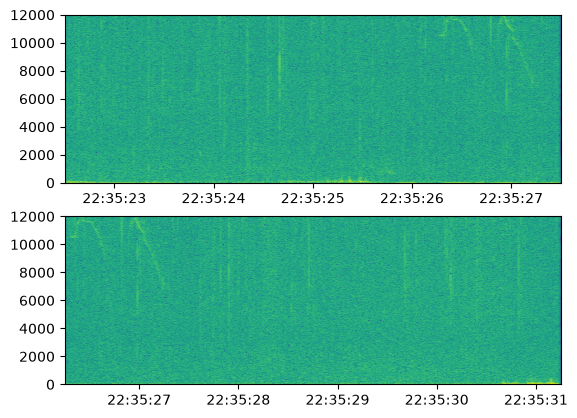
Running the transform while specifying the filtered audio_dataset will skip the empty AudioData (and thus the empty SpectroData).
project.run(transform=transform, audio_dataset=audio_dataset)
	2026-09-28 15:48:24,839
Running transform...
	2026-09-28 15:48:24,840
Computing and writing spectrum matrices and spectrograms...
	2026-09-28 15:48:31,073
Computing and writing welches...
	2026-09-28 15:48:31,239
Transform done!
All the new files from the transform are stored in a SpectroDataset named after transform.name:
pd.DataFrame(
    [
        {
            "Exported file": list(sd.files)[0].path.name,
            "Begin": sd.begin,
            "End": sd.end,
            "Sample Rate": sd.fft.fs,
        }
        for sd in project.get_output(transform.name).data
    ],
).set_index("Exported file")
| Begin | End | Sample Rate | |
|---|---|---|---|
| Exported file | |||
| 2022_09_25_22_35_15_000000.npz | 2022-09-25 22:35:15.000 | 2022-09-25 22:35:20.000 | 24000 |
| 2022_09_25_22_35_18_750000.npz | 2022-09-25 22:35:18.750 | 2022-09-25 22:35:23.750 | 24000 |
| 2022_09_25_22_35_22_500000.npz | 2022-09-25 22:35:22.500 | 2022-09-25 22:35:27.500 | 24000 |
| 2022_09_25_22_35_26_250000.npz | 2022-09-25 22:35:26.250 | 2022-09-25 22:35:31.250 | 24000 |
| 2022_09_25_22_35_30_000000.npz | 2022-09-25 22:35:30.000 | 2022-09-25 22:35:35.000 | 24000 |
| 2022_09_25_22_35_33_750000.npz | 2022-09-25 22:35:33.750 | 2022-09-25 22:35:38.750 | 24000 |
| 2022_09_25_22_35_37_500000.npz | 2022-09-25 22:35:37.500 | 2022-09-25 22:35:42.500 | 24000 |
| 2022_09_25_22_35_56_250000.npz | 2022-09-25 22:35:56.250 | 2022-09-25 22:36:01.250 | 24000 |
| 2022_09_25_22_36_00_000000.npz | 2022-09-25 22:36:00.000 | 2022-09-25 22:36:05.000 | 24000 |
| 2022_09_25_22_36_03_750000.npz | 2022-09-25 22:36:03.750 | 2022-09-25 22:36:08.750 | 24000 |
| 2022_09_25_22_36_07_500000.npz | 2022-09-25 22:36:07.500 | 2022-09-25 22:36:12.500 | 24000 |
| 2022_09_25_22_36_11_250000.npz | 2022-09-25 22:36:11.250 | 2022-09-25 22:36:16.250 | 24000 |
| 2022_09_25_22_36_15_000000.npz | 2022-09-25 22:36:15.000 | 2022-09-25 22:36:20.000 | 24000 |
| 2022_09_25_22_36_18_750000.npz | 2022-09-25 22:36:18.750 | 2022-09-25 22:36:23.750 | 24000 |
| 2022_09_25_22_36_22_500000.npz | 2022-09-25 22:36:22.500 | 2022-09-25 22:36:27.500 | 24000 |